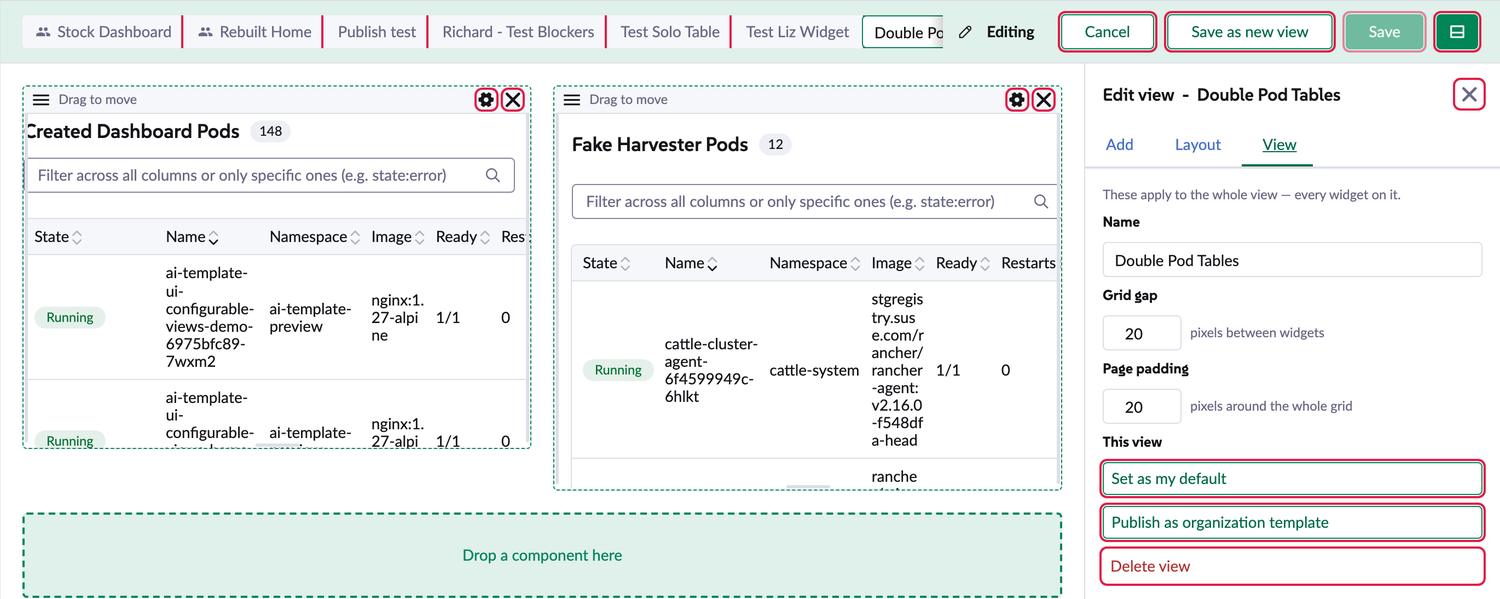
Preview:base preview, built from 0f34877 on a shell we packed in October, which predates the new stock cards. Backend mf Rancher (v2.16.0-7758e3e-head). The bar starts hidden: press Ctrl/Cmd+Shift+V, or use the list icon in the header. Baseline: the shared dashboard-master preview, built from 261b8932f, the current tip.
Where it stands: nothing has changed on the PR yet
No code, no replies. Of Richard's 32 threads, 23 get fixed in this PR, 1 in a follow-up PR, 3 get a reply, 1 waits on a shell release, 2 wait on UX and 2 need your call. The review body adds 3 more fixes (M1-M3). Later and TBD items stay out.
What changed since the plan I sent you
Non-admins can't use views at all today. I expected this, and now it's confirmed: both of Richard's QA personas get Forbidden. New Decision 4.
The 3-second delay is reproduced, and it's wider than a fresh install. Anyone without access to the ConfigMaps waits 2 seconds on every visit (M1).
The gap with the stock dashboard is five differences, not only the cards (M2).
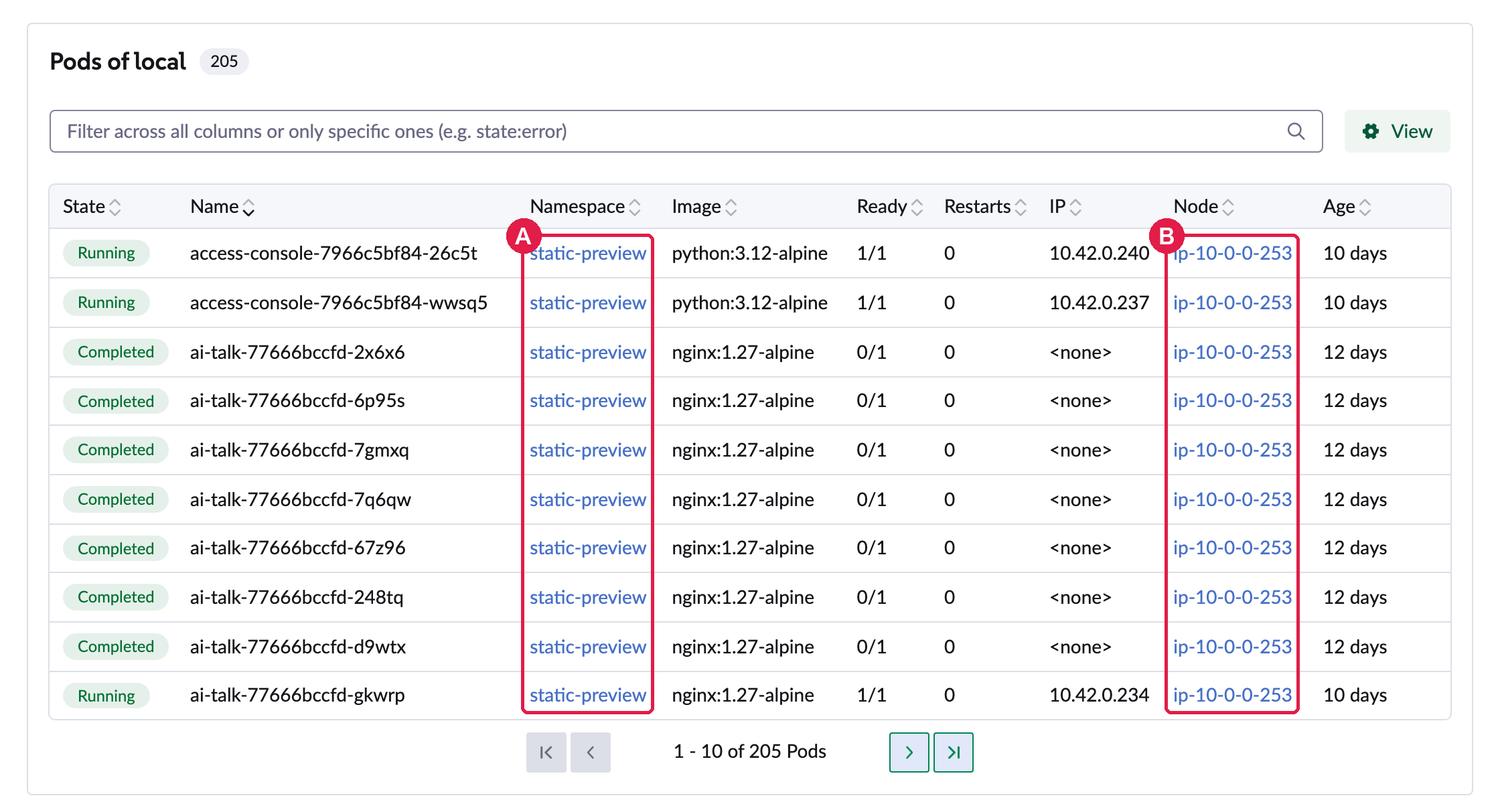
Namespace and Node links go to the wrong cluster today, and getCustomDetailLink alone won't fix them (thread 18).
Two things I told you were wrong. A missing type="text" doesn't cause the centring problem (thread 20). And there are 30 raw buttons, not 31 (thread 21).
Everything else can start without these. To answer, something like "1A 2A 3A 4A, skip thread 23" is enough.
1. Should I remove the stored kill switch? thread 29
Today it's a value in a ConfigMap that non-admins can't read, and they read "can't tell" as on. So turning it off doesn't reach the people it's meant for.
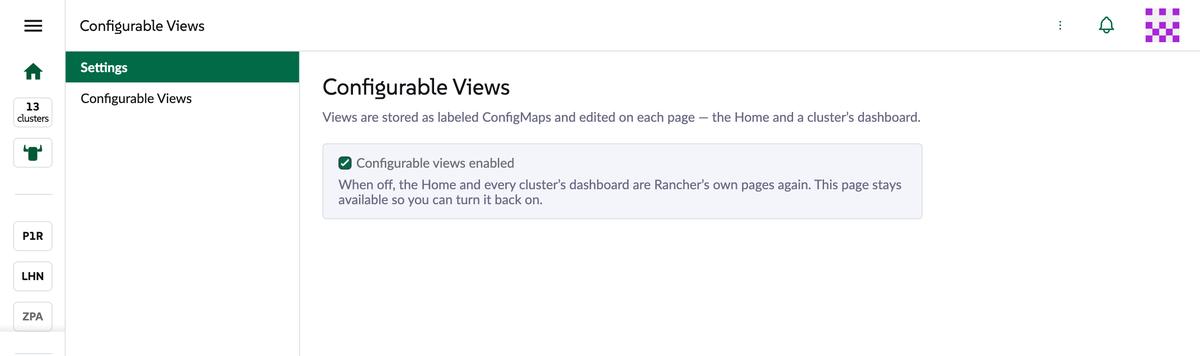
A. Remove it (recommended). Remove the stored switch, its shortcut and the base's Settings page, and keep ?confviews=false as the temporary off. This is Richard's alternative, minus the flag check, which stays on their TBD list. The base product keeps only the Views page. PR 2 keeps Settings for widget approvals.
B. Per-user switch in preferences. Richard's first idea. Each person can turn it off for themselves, but nobody can turn it off for everyone.
C. A, and check the flag now.ui-configurable-dashboards exists in rancher main, but it's off by default, off on mf and hidden from the Feature Flags list. The feature would disappear everywhere we test until someone turns the flag on with kubectl, and the list needs a shell change.
2. Should I build the "not live" hint and Refresh button now? thread 30
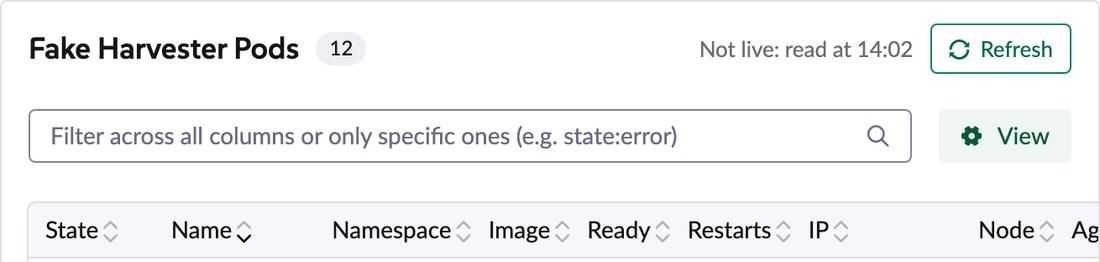
Richard lists this as MVP but tags it for UX and dev to discuss. Here's what I'd propose. It's a mock-up drawn into the page, with nothing behind it.
Mock-up: "Not live: read at 14:02" and a Refresh button on a widget that reads once.
A. Propose it, then build (recommended). The mock-up goes in my reply, and I build it in this PR once Richard or UX agree. Everything else carries on meanwhile.
B. Build it now. Faster if they agree, rework if UX wants something else.
C. Hint only, no button. The least Richard's MVP asks for: "make this clear to users".
3. Should this repo become the only place the code changes?
These fixes make the new repo differ from configurable-home and configurable-home-demo on rancher-ai-template, and from configurable-views on your dashboard fork.
A. Yes, freeze the old copies (recommended). This replaces the "move both together" rule. PR 1 and PR 2 are the only live code.
B. No, keep them in sync. Every fix gets copied to all of them, for no benefit I can see.
4. When do we fix storage for non-admins? New
Richard's QA list expects non-admin users to manage views on both dashboards. Views live in ConfigMaps in default on the local cluster, and those users can't touch them. Only admins and local cluster owners can.
User on mf
Read views
Create
Change
Standard user, cluster member on created-dashboard-2 Richard's first persona
Forbidden
Forbidden
Forbidden
Standard user, cluster member on local
Forbidden
Forbidden
Forbidden
Standard user, cluster owner on local
Allowed
Allowed
Allowed
User-base, project owner on created-dashboard-2 More access than Richard's second persona, a project member
Forbidden
Forbidden
Forbidden
User-base, project roles on local
Forbidden
Forbidden
Forbidden
User-base, project owner on local and created-dashboard-2
Forbidden
Forbidden
Forbidden
Real requests with kubectl --as, and --dry-run=server for the writes, so nothing was written.
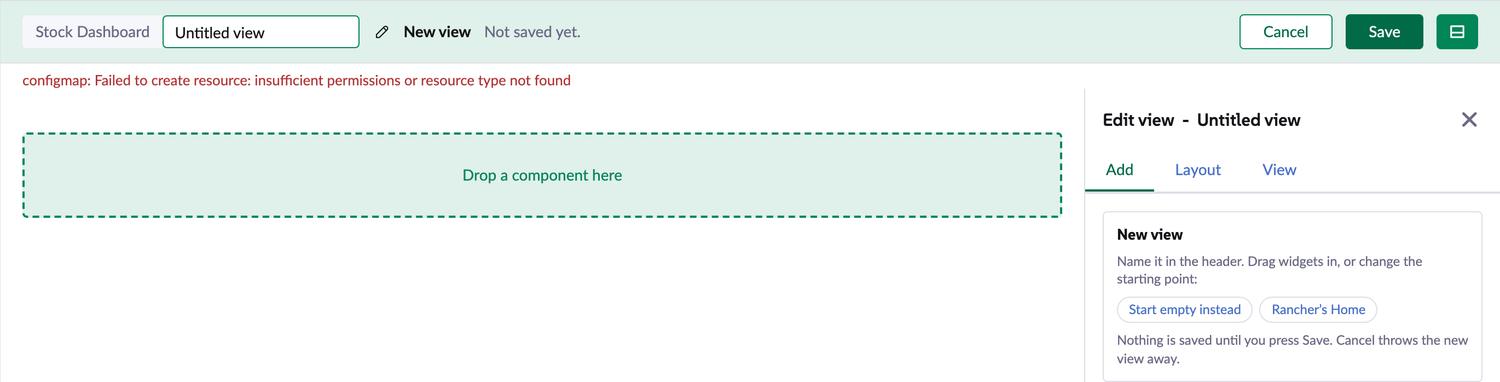
What they'd see: only the Stock Dashboard tab. They can build a whole view, but Save fails, so there's no way to keep it. I simulated this in an admin session with the configmap schema removed. It's not a real non-admin login.
The Save error with no access to ConfigMaps.
A. Tell Richard now, fix it in the next PR (recommended). Personal views move to user preferences and published views to a CRD like the table views one, as their TBD items suggest. It needs a backend change, so it doesn't belong in a PR of review fixes. M1 still removes the 2-second wait for these users in this PR.
B. Do it inside PR 1. PR 1 gets much bigger and has to wait for a backend change.
C. Grant everyone access to those ConfigMaps. Not recommended: anyone could read and overwrite everyone's views, because they all share one ConfigMap.
Draft comment on the review
One for your QA list: the non-admin scenarios can't pass yet. Views are in ConfigMaps in default, and both personas get Forbidden on read and write, so they only see the stock tab and Save fails. I'd treat your TBD storage items as the next PR after this one: personal views in user preferences, published views in a CRD like the table views. Does that work, or do you want it in this PR?
MVP items from the review body
These have no thread of their own. "Make extension prime only" is thread 5.
MVP: fresh instance, no views, there's a noticable (+3 second) delay when navigating to home/explorer dashboard page and seeing the dashboard content. think this is caused by 5 sequental requests to /v1/configmaps/default?pagesize=100000&filter=metadata.labels[templates.rancher.io/ai-templating]%20IN%20(true)&exclude=metadata.managedFields. i could not reproduce this later on when there were views
What I found
Reproduced, and Richard's diagnosis is right. useViewSet.load() keeps retrying, 500ms apart, up to 5 reads, whenever it finds nothing. Stubbed reads answer instantly, so the 2 seconds below are only the waiting. Real reads add their own time, which fits Richard's 3+.
It's also wider than a fresh install. Anyone who can't read the ConfigMaps never finds anything, so they wait those 2 seconds on every visit to the Home or a cluster dashboard.
Case
Home shows after
Dashboard shows after
Reads
Stock master, no extension
31-133ms
47-249ms
0
Extension, views stored (real data)
215-437ms
211-260ms
2
Extension, nothing stored (stub, Richard's case)
2,050-2,122ms
2,064-2,116ms
7-10
Extension, read answers 403 (stub)
2,046-2,127ms
2,070-2,094ms
6
Extension, no configmap schema (stub)
2,049-2,115ms
2,046-2,061ms
0
3 in-app navigations per case, on the base preview and the master preview. The 2-second wait with 0 reads is the retry loop waiting for a read it skips.
What I'll do
The loop's comment gives two reasons for retrying: the user may not be known yet, and the ConfigMaps may not exist yet. Asking for the user first solves the first. The second went away with the seeding code. So: get the user, read once, and share that read with the onEnter hook, which is why even stored views make 2 reads today. A failed read leaves the stock page showing, and the next navigation reads again.
This changes my plan. I said "retry only if the read failed", but a 403 is a failed read, so non-admins would still wait. No retry at all is simpler and fixes both.
To check it, I'll re-run this table, and open the Home straight after login to make sure views still appear.
MVP: Delta between new Cluster Explorer Dashboard components and stock Cluster Explorer Dashboard components (they should use the same components, with the table widget wrapping the dashboard one)
What I found
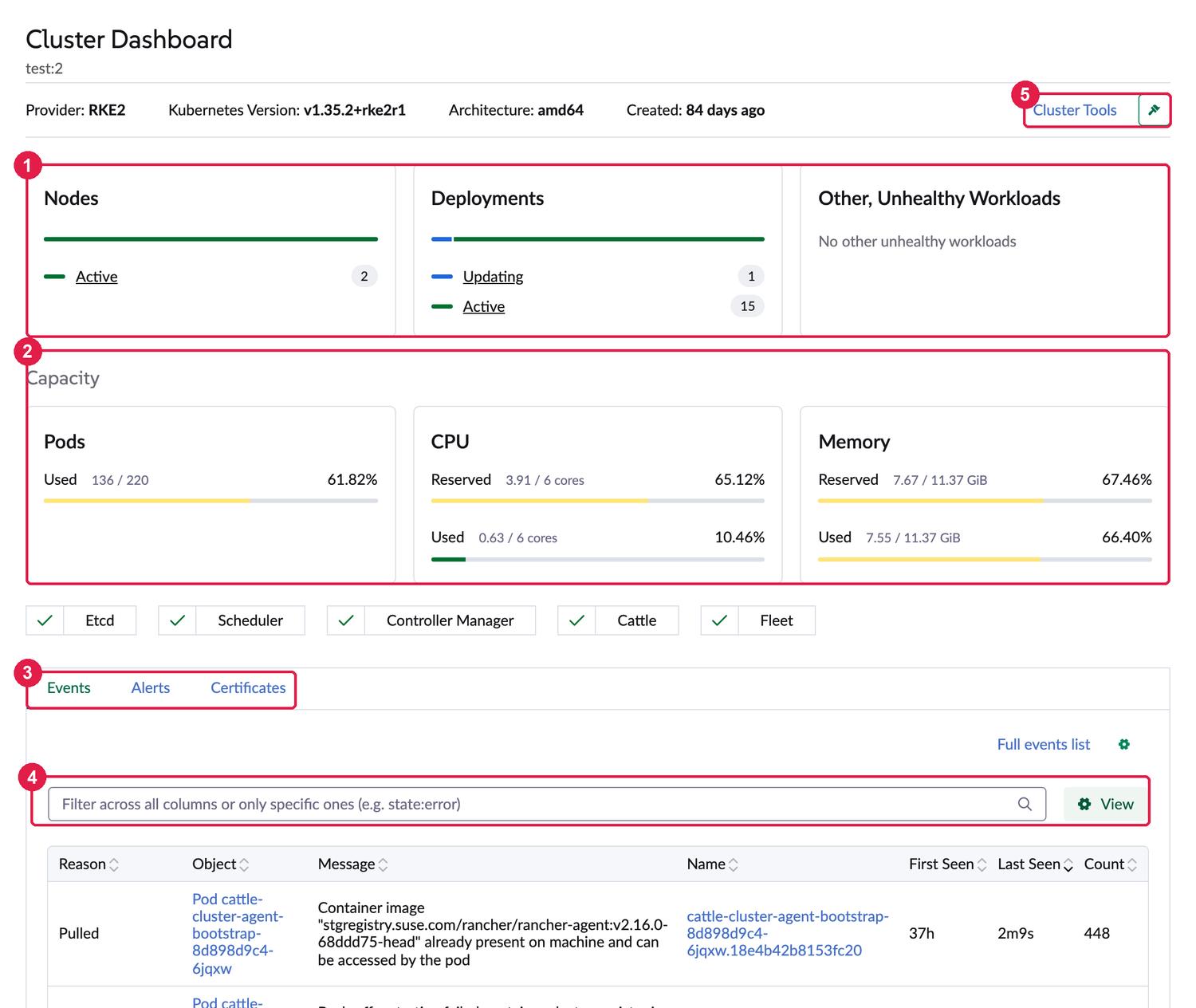
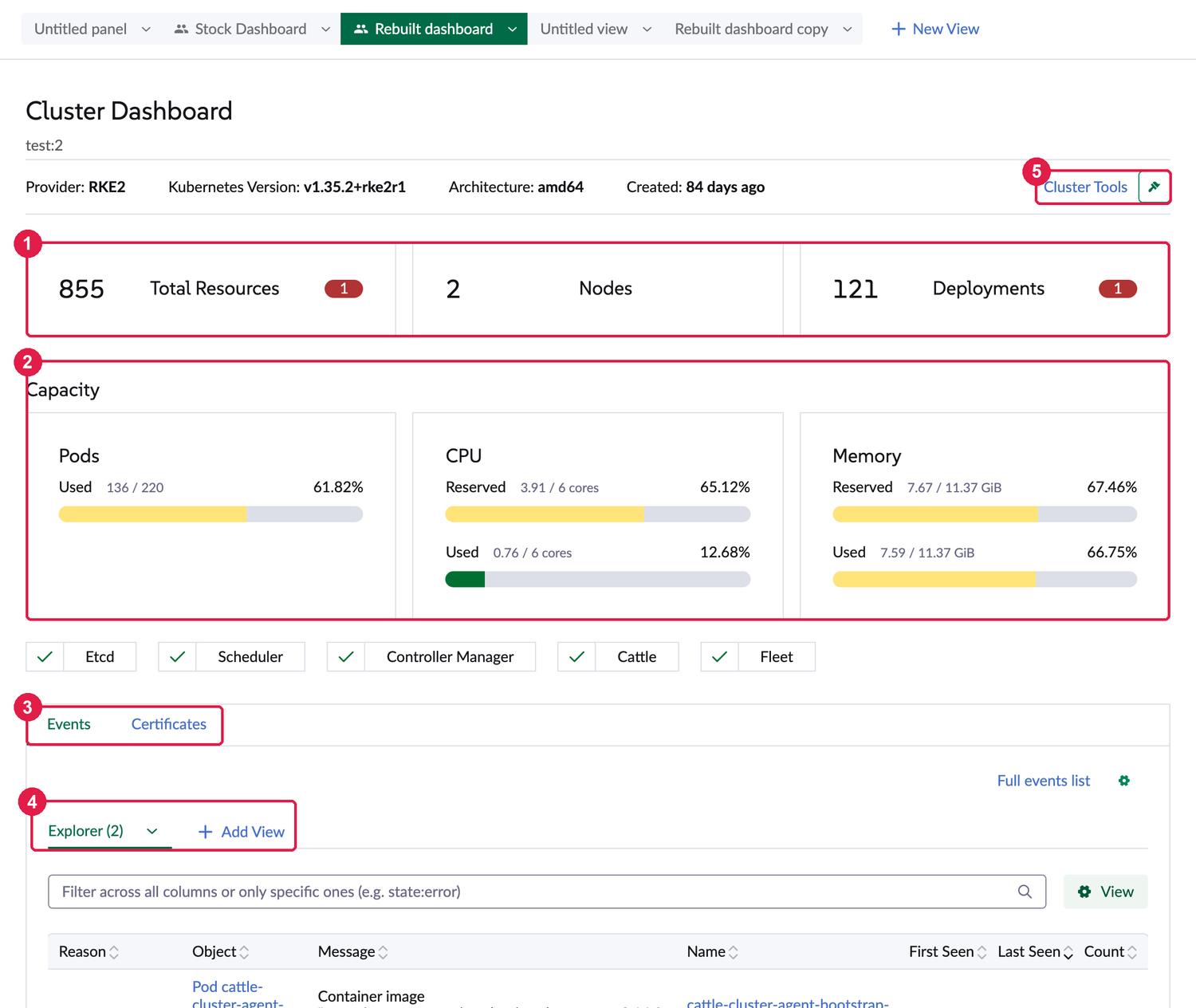
I told you this was the resource cards. The cards are the biggest part, but comparing them side by side shows five differences. Same cluster and window size. The numbers on the shots match the table under them.
Stock: master preview at 261b8932f.Ours: the Rebuilt dashboard view on the base preview, on the older shell.
#
Stock
Ours
Why
Fix
1
Status cards: Nodes, Deployments, unhealthy workloads
Count cards: 855 Total Resources, Nodes, Deployments
Stock moved to ResourceStatusCards on 2026-10-17. Our widget always draws ResourceSummary
Render ResourceStatusCards on the open cluster, as Events and Alerts already do. Needs shell 3.0.15-rc.4. Other clusters keep today's cards, because the stock ones only read the cluster store
2
Thin bars, grey heading
Thick bars, black heading
Bars: only our preview's older shell. The widget already uses the stock HardwareResourceGauge, so a rebuild brings them. Heading: the widget has its own <h3>, and stock added text-deemphasized
Copy the heading's classes
3
Has an Alerts tab here
No Alerts tab here
Stock checks for any app in cattle-monitoring-system. We look for the monitoring chart by name. This cluster has only rancher-monitoring-crd and no monitoring pods, so stock shows a tab with nothing behind it
Use stock's check, from the cluster's counts
4
No row above the Events filter
Extra "Explorer (2) / Add View" row
Stock's page does provide: { showTableViewTabs: false }. Ours doesn't
Provide it from the widgets that draw the dashboard's tables
5
Cluster Tools about 20px from the pin
About 10px from the pin
We redraw the header, because stock has it inline in the page
Copy the spacing
What I'll do
Fix all five, bump the root @rancher/shell to 3.0.15-rc.4 (an RC until 3.0.15 ships), and rebuild the previews on it. Then I'll compare again on the same shell and list anything left, including the Alerts and metrics tabs on a cluster that really has monitoring.
What this won't fix: the cluster header and component status stay redrawn, because stock has them inline in its page. Truly sharing them needs a shell PR that pulls them out. I'll ask Richard whether they want that.
MVP: Hide views bar (with tabs) shortcut is currently ctrl + shift + v which clashes with unformatted paste
The bar this shortcut shows and hides.
What I found
Shift plus a letter is already how the shell does this: its page templates bind Shift+T for the theme and Shift+L for the locale, and detail pages and tables use C, D, E, Y, J and K. V isn't taken, in the shell or in this package. The shell's shortcut plugin stays out of the way while focus is in an input, textarea, select or editor, so typing a capital V in a form is safe.
What I'll do
Set the shortcut to ['shift', 'v'] on both platforms and update the comment at index.ts:63-66. I'll press it on the preview, on a page and inside a text field.
The 32 threads
Two ways a table reads
Threads 17, 25 and 26 are all about this, and it's why Richard saw no SSP.
From a cluster (fromCluster: true)
From Rancher (fromCluster: false)
Drawn by
ResourceTable, rows from useClusterPage
PaginatedResourceTable, context home
Rows
Up to 500, read once. The browser pages them, and a note says when the list was cut
Local cluster and Rancher types, through the store
SSP
Never
Only clusters: home turns it on for CAPI.RANCHER_CLUSTER and MANAGEMENT.CLUSTER alone
Schema
The store if it knows the type, else that cluster's /v1/schemas
The store
Cleanup and metadata
First commit. Mechanical, nothing a user would see.
1#!/usr/bin/env node2/* eslint-disable no-console */3// Regenerate pkg/ai-templating/install/manifests.ts from the YAML sources, so the extension can4// embed and auto-install its cluster dependencies (see pkg/ai-templating/install/ensure.ts).5//6// node scripts/gen-manifests.mjs
What I found
It regenerates pkg/ai-templating/install/manifests.ts. That folder no longer exists, and nothing in the repo calls the script.
1#!/usr/bin/env node2/* eslint-disable no-console */3// Regenerate pkg/ai-templating/install/manifests.ts from the YAML sources, so the extension can4// embed and auto-install its cluster dependencies (see pkg/ai-templating/install/ensure.ts).
1#!/usr/bin/env node2/* eslint-disable no-console */3// One-shot: convert the CustomView/HomeTemplate example CRs into labeled ConfigMaps (the new4// storage). Overwrites the example files in place.
What I found
It was a one-shot that converted old example CRs into ConfigMaps. Those examples are gone, and nothing calls it.
What I'll do
Delete scripts/crs-to-configmaps.mjs. That empties scripts/.
Still rancher-ai-template, left over from the exact copy. Once the scripts go, the only other old name is the ai-templating label and its test. That label stays on purpose, because it is on every stored ConfigMap.
What I'll do
Set name to ui-configurable-views. The extension's own package stays configurable-views.
The shell reads catalog.cattle.io/prime-only and refuses the extension on a non-Prime Rancher (plugins.error.primeOnly). The shell's helm patch script copies rancher.annotations from this file into the chart.
What I'll do
Add "catalog.cattle.io/prime-only": "true" under rancher.annotations. This also closes the "Make extension prime only" MVP. Baked-in previews skip this check, so only a real install proves it.
not sure i get this.
we're redirecting from c-cluster-"configurable-views"-x to "configurableviews"-c-cluster-x? does anything use c-cluster-configurable-views?
The code it points at
1import type { RouteRecordRaw } from 'vue-router';2import { ROUTE_SETTINGS, ROUTE_VIEWS } from '../templating/template-engine';34// The product's own pages are routed by the Product API (see product.ts). These are only where they5// used to be, so an old link or bookmark still lands. They sit under the 'default' layout - named, as6// the shell asks of an extension's routes.7const LAYOUT = 'default';
What I found
Nothing does. They send the old prototype paths (/c/:cluster/configurable-views, /views, /layouts) to the product's pages, which the Product API routes by itself. ROUTE_SETTINGS and ROUTE_VIEWS are only used here.
What I'll do
Delete routing/index.ts, the plugin.addRoutes(routing) call and the two constants. An old prototype bookmark stops working, which is fine for something unreleased.
Draft reply
Nothing uses them. They were redirects for old prototype bookmarks, so I removed them.
268 return list.filter((entry) => textOf(entry).toLowerCase().includes(needle));269}270271/**272 * The resources offered in a widget's "Resource" picker. Any type Rancher knows can be typed in,273 * but these are the ones worth suggesting.274 */
What I found
Yes. It describes a Resource picker list that no longer exists, and sits right above the doc block of PAGINATION_CONTEXT.
we have this one already - shell/config/types.d.ts CONFIG_MAP
The code it points at
1819type Getters = Store<unknown>['getters'];2021const CONFIGMAP = 'configmap';22const NAMESPACE = 'default';2324// Every stored ConfigMap carries the marker; the type label tells them apart.
What I found
CONFIG_MAP in @shell/config/types has the same value.
up to you, but for all references to vuex Store you could use shell/types/store/vuex.d.ts VuexStore. That might make it easier if we ever type that store properly
The code it points at
16import { migrateViewSet } from './view-model';17import type { ViewSet } from './types';1819type Getters = Store<unknown>['getters'];2021const CONFIGMAP = 'configmap';22const NAMESPACE = 'default';
What I found
The comment says it's optional, but it's cheap. VuexStore is in published shell 3.0.14 and later, and there are 24 non-test references to Store<...>.
What I'll do
Replace them. If the type check finds a place where VuexStore is too narrow, I'll list it rather than cast around it.
can home and if used somewhere cluster dashboard keys be consts somewhere
The code it points at
83 * like the dashboard, the view leaves them out wherever a cluster does not have them.84 */85export function stockWidgets(page: PageKey, t: Translate): WidgetNode[] {86 if (page === 'home') {87 const { gap, pad } = stockView(page);8889 // The banner runs edge to edge over the view's inset, as the Home's does; the panel below it
What I found
'home' means three things in this package: a page key, a links source and the pagination context. Only the page key and 'clusterDashboard' are what this comment is about.
What I'll do
Add PAGE_HOME and PAGE_CLUSTER_DASHBOARD next to PageKey, and derive the type from them. The other two meanings of 'home' stay. Stored keys don't change.
terminology wise should this name contain or be Page?
i think it's then something like...
- Page
- views (which are the page's tabs)
- view (a page tab)
- widgets
- table
- overview
- tabs
- widgets
The code it points at
157export type View = LayoutView | StockView;158159/** What one scope - the organization, or one person - has saved for a page: its views, and which opens first. */160export interface ViewSet {161 views: View[];162 defaultViewId?: string;163 /**
What I found
It holds what one scope, the organization or one person, saved for a page: its views, which one opens first, and the tab order. Plain Page doesn't fit, because PageConfig already holds all the scopes of a page. The type name isn't stored anywhere.
What I'll do
Rename ViewSet, useViewSet and migrateViewSet to PageViews, usePageViews and migratePageViews. That's 63 references in 12 files, tests included. It's mechanical, so it gets its own commit.
Draft reply
Agreed with your hierarchy. I renamed it to PageViews, since it's one scope's views for a page. Plain Page would clash with PageConfig, which holds all the scopes. Nothing stored changes.
can this use shell/plugins/steve/schema.d.ts (would need updating)
The code it points at
2// cluster's. Pure functions - no Vue, no store.34/** A schema as Steve serves it - the parts the Resource picker reads. */5export interface TypeSchema {6 id: string;7 collectionMethods?: string[];8 attributes?: {
What I found
Schema in shell/plugins/steve/schema.d.ts has id and attributes, but not collectionMethods, attributes.kind or attributes.group, which the Resource picker reads. Richard already expects it needs updating.
What I'll do
Import Schema and extend it locally with those three fields. The shell type gets them in the same dashboard PR as thread 28, then the local part goes.
Draft reply
Done. It extends Schema locally for the three fields it lacks. I'll add them to the shell type in a dashboard PR and drop the local part then.
there's a few dangling comments above functions instead of jsdocs across quite a few files. worth getting ai to do a convert to jsdoc run
The code it points at
116 }117 }118119 // Write the draft to your account.120 async function save({ keepEditing = false } = {}): Promise<void> {121 const draft = working.value;122
What I found
A script finds 55 // comments directly above a function, in 21 files. useGridEditing and useEditSession have the most, 7 each. There's also a doc block in the wrong place at widget-data.ts:188.
What I'll do
Convert them to /** */ and move the misplaced one. Section-divider comments stay. Comment-only commit, so it's easy to review.
something feels off here
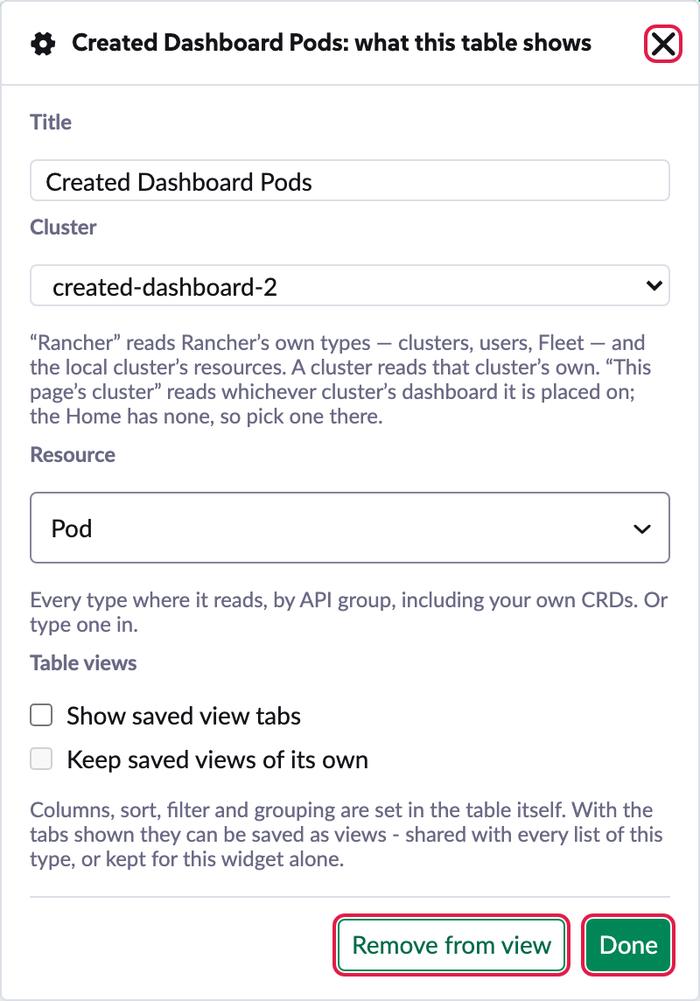
for items in this hardcoded list we basically don't do server-side pagination, given view-models.ts READ_FROM_A_CLUSTER.includes(out.resource)? unless that's set directly to cluster in widgetsettingsmodal?
i gave this a test with pods and my CR and in both dashboards we're not doing SSP
The code it points at
300 out.ownViews = true;301 }302 if (out.kind === TABLE_KIND) {303 out.fromCluster = typeof w.fromCluster === 'boolean' ? w.fromCluster : READ_FROM_A_CLUSTER.includes(out.resource);304 }305306 // `subtitle` and `image` are banner-only extras; keep them only when set so stored specs stay small.
What I found
READ_FROM_A_CLUSTER only fills in fromCluster for tables saved before that setting existed. All 5 tables stored on mf set it explicitly, so nothing depends on it. It also isn't why Richard saw no SSP. See two ways a table reads.
What I'll do
Remove the list, so a table with no fromCluster reads from Rancher, and update the test at view-model.test.ts:151. In PR 2, the agent's prompt has to start setting fromCluster, because it doesn't mention it today.
Draft reply
That list only fills in fromCluster for tables saved before the setting existed. It doesn't choose anything for a new table. Every stored table we have sets it, so I removed it. No SSP in your test is a separate thing: a table reading from a cluster reads up to 500 rows and pages them in the browser, and a table reading from Rancher uses the home context, where only the two cluster types have SSP on. That's your "Later: Integrate SSP".
You should be able to make use of the LinkDetail getCustomDetailLink to
- check for a cluster in the url
- swap out the target cluster
This means the name will work, but also for other usages like namespace and pod node links
The code it points at
83 * wrong cluster - the stock Home's own cluster table drops it for the same reason.84 */85function withoutDetailLink(header: TableColumn): TableColumn {86 if (header?.formatter !== 'LinkDetail') {87 return header;88 }89
What I found
Richard is right, and there's a live bug next to it. I put a table of local's pods on created-dashboard-2's dashboard, in my browser only. Name has no link, because withoutDetailLink removes it. Namespace links to /c/c-m-bmsk94st/explorer/namespace/static-preview and Node to /c/c-m-bmsk94st/explorer/node/ip-10-0-0-253, both into the wrong cluster. On the Home those columns are plain text.
The catch:getCustomDetailLink only reaches formatters that declare it. Name uses LinkDetail, which does. Namespace uses LinkName and a pod's Node uses LinkNamePopover. Neither does, and both read the open cluster from the store. A table-level function also gets only the row, so it can't tell columns apart. My plan said this would only miss the node link. It misses the namespace link too.
A and B link into created-dashboard-2, but these rows belong to local. The view only existed in my browser.
What I'll do
On the open cluster the stock formatters are already right, so they stay. For a table of any other cluster, headersFor swaps each link column for LinkDetail with its own getCustomDetailLink in formatterOpts, which the table binds after its own prop, so it wins. Name uses row.detailLocation, reference columns such as a PVC's claim use their reference, and Namespace and Node build the route from their type and value. All of them get the widget's cluster and the explorer product. Tables reading from Rancher treat local as their cluster. In those tables the Node popover goes away, because it fetches from the open cluster. I'll check pods, PVCs, a CRD and a Rancher type such as clusters on the preview.
Draft reply
You're right, and it's more than a missing link: on a cluster's dashboard, a table of another cluster links Namespace and Node into the open cluster. getCustomDetailLink brings back Name. Namespace and Node use LinkName and LinkNamePopover, which don't take it, so for a table of another cluster I swap those columns to LinkDetail with their own link in formatterOpts.
will this persist over log out / in?
normally it would be yes, but for extensions do we unload on log out?
might be safer as a cache in the core or management stores
The code it points at
151// request answers both: an answer is kept for a few seconds, and a request still in flight is152// shared rather than repeated. Short on purpose - this is de-duplication, not a cache to go stale.153const SHARED_MS = 5000;154const shared = new Map<string, { at: number; promise: Promise<unknown> }>();155156function once<T>(key: string, load: () => Promise<T>): Promise<T> {157 const hit = shared.get(key);
What I found
It depends on the install. From reading the shell: auth/logout removes non-builtin extensions and login loads the script again, so a real extension starts fresh. Baked-in builds, like our previews, keep the module, so entries can survive for up to their 5-second window. An onLogout hook wouldn't help a real extension, because it's removed before that hook runs. monitoring in useWidgetPresence has the same shape with a 60-second window. I haven't tested this with a real extension.
What I'll do
Add the user's id to the cache keys and delete expired entries on each read, in both places.
Draft reply
Yes for baked-in builds, no for a real extension: logout removes non-builtin plugins and login loads the script again, so module state starts fresh. To be safe in both, I keyed the entries by user and drop expired ones. A store module felt like more than a 5-second de-dupe needs, but I can move it if you prefer.
My first guess, the missing type="text", was wrong: adding it changes no computed style. Richard's screenshot is the bar's edit input (30px box, text about 1px low), and my render matches it. The rename input Richard calls fine has the same class and measures the same, so I can't reproduce a difference between them. It's the font sitting a little low, not a broken rule.
Input, measured with an H
Chromium
Firefox
WebKit
With 1px padding
Bar, edit mode (.vbar__name)
+0.83px
+0.50px
+0.17px
−0.17px in all three
Bar, rename (.vbar__name)
+0.83px
+0.50px
+0.17px
Same class
Sidebar name (.evs__field)
+0.33px
+0.67px
+0.67px
+0.33 / +0.33 / 0px
Stock list filter, for comparison
+0.33px
Not measured
Not measured
Positive means below centre. CSS pixels, from a 3x screenshot.
What I'll do
padding-bottom: 1px on .vbar__name and .evs__field. I tried it with an injected style in all three engines, which gave the last column.
Draft reply
I measured these inputs in Chromium, Firefox and WebKit. They all sit up to 1px low, and the edit input and the rename input in the bar measure the same. 1px of bottom padding on both classes brings them within about 0.3px everywhere. If you still see it, which browser are you on?
think _most_ (all?) of the buttons can be RcButtons
The code it points at
544 :distance="4"545 :aria-label="t('configurableViews.bar.moreActions')"546 >547 <button548 :ref="(el) => keepRef(tabButtons, view.id, el as HTMLElement | null)"549 type="button"550 role="tab"
What I found
This line is the bar's tab button. It can convert: a role="tab" passed from here overrides RcButton's own role, and RcButton exposes focus() for the arrow keys.
What I'll do
Convert it with thread 21. If the tab's look or keyboard handling suffers, I'll keep this one and say why in the reply.
The comment in the file gives two reasons for not using Tabbed. The URL hash one is out of date, because it has useHash (in 3.0.14 too). The other is that its tabs are child components, while these are data that change during editing. A v-for of Tab should handle that, but I haven't tried it. The hard part is dragging a widget over a tab to open it, which Tabbed doesn't do. The strip already copies its look, so users shouldn't notice the swap.
What I'll do
Tabbed with :use-hash="false", one Tab per item (name, label, weight, and badge for the count while editing), content behind a v-if so hidden tabs don't fetch, and a drag listener on the strip for open-on-hover. If that breaks dragging, I'll keep the strip and tell you why before replying.
Follow-up PR
Too big for this PR. Starts right after it merges.
can we flip this somehow
Widgets contain the metadata to do stuff like showing data source things (which is currently the case) but also supply a vue component to configure whatever settings it needs? that keeps components as owners of what they show and their configuration... and means extensions in the future can easily add widgets
Richard is right about the shape. A new widget kind touches three places today: a v-if block in this dialog (lines 342, 382, 406, 442, 456, 475), RENDERERS in WidgetHost.vue and CLUSTER_WIDGETS in widget-catalog.ts. An extension can't add to any of them.
A table's settings.A banner's settings. Each is a block in the same file.
What I'll do
Each kind declares its component, its settings component and its metadata in one entry. The dialog keeps only what they all share. It's the biggest change here (the dialog is 760 lines, 950 in the demo), so I'd keep it out of this PR to avoid holding up the base. Tell me if you want it in PR 1 instead.
Draft reply
Agreed, that's the right shape: each kind brings its component, its settings component and its metadata, so extensions can add widgets. It touches the dialog, the host and the catalog, so I'd do it as its own PR right after this one rather than hold up the base.
Reply only
Nothing to change, or almost nothing. Richard asked a question and these answer it.
something feels off here
i created a CRD in a downstream cluster. i then created a home page list targeting that cluster and using the CRD. on refresh the page correctly loads the table and shows results from that cluster.
according to this though it should fail to load given it's not in management, current cluster (cluster) or cluster?
The code it points at
4748 const stores = ['management', getters['currentStore'](type), 'cluster'];4950 return stores.find((store) => store && getters[`${ store }/schemaFor`]?.(type)) || 'management';51}5253/** Every cluster the user can see, as picker options, by the name a person would recognise. */
What I found
storeForType only picks a store to look a schema up in, and falls back to management. For a table reading from a cluster, nothing depends on that: the schema comes from that cluster's /v1/schemas, and the rows from a findPage given that cluster's URL.
What I'll do
No change.
Draft reply
storeForType only picks a store to look the schema up in, and falls back to management. A table reading from a cluster doesn't depend on it: the schema comes from that cluster's /v1/schemas, and the rows from a findPage with that cluster's URL. That's why your CRD loaded.
i'm not 100% sure but this could be one of the reasons not many lists use server-side pagination
The pagination context is set to home... which is only set for a couple of the cluster types.
No change now. This is the "Later: Integrate SSP" item.
Draft reply
You're right, home only has SSP on for the two cluster types, so a table from Rancher of anything else pages in the browser. Tables from a cluster don't use that path at all: they read up to 500 rows and say so when the list is cut. I've left this for your "Later: Integrate SSP".
this is on shell/models/steve-schema.ts canList
it doesn't to the get, but it's the common place we check if we can list
The code it points at
27 * Can a list of it be read? A Kubernetes kind whose collection answers a GET, and, where the schema28 * says which verbs it allows, one of them is `list` - some, like a kubeconfig, can only be made.29 */30export function isListable(schema: TypeSchema): boolean {31 const verbs = schema.attributes?.verbs;3233 return !!schema.attributes?.kind &&
What I found
canList is a getter on the schema model, and its helper canSchema isn't exported. These schemas are raw JSON from another cluster, so they aren't models. canSchema asks for a collection link and the verb. isListable asks for a kind, a GET collection method and the verb only if verbs are present.
What I'll do
Keep isListable, but make it ask what canList asks as well: the collection link, and always the verb. This is the one small code change in this group.
Draft reply
canList is a getter on the schema model, and these schemas are raw JSON from another cluster, so I can't call it. I kept isListable and made it check the same collection link and verb.
Waits on a shell change
Needs a dashboard PR and a shell release, on the 2.17 milestone.
132133type Loose = Record<string, unknown>;134135function isObject(v: unknown): v is Loose {136 return !!v && typeof v === 'object' && !Array.isArray(v);137}138
What I found
shell/utils/object.js doesn't export one today. Moving it needs a dashboard PR and a shell release.
What I'll do
Keep it local for now. Do it in one dashboard PR with the Schema fields from thread 15. Two other shell changes would help later: unhide the feature flag, and let useResourceStateSummaries take a cluster.
Draft reply
It isn't exported from there today, and moving it needs a dashboard PR and a shell release, so it stays local for now. I'll do it together with the Schema type change.
this will need to live in a place where all users can access it.
i think we can shift it to be per user, and in userpreferences.
alternatively we can just rely on
- global feature flag
- temporary runtime disable (if the user then wants to disable feature flag via ui)
The code it points at
155156/** data.enabled === 'false' turns the feature off. Absent, or anything else, means on. */157export function isTemplatingEnabled(getters: Getters): boolean {158 return cmNamed(getters, CONFIG_NAME)?.data?.enabled !== 'false';159}160161/** The URL's own switch: `?confviews=false`. */
What I found
Richard is right. isTemplatingEnabled reads templating-config in default. A user who can't read it gets undefined, which counts as on, so turning it off never reaches them.
What I'll do
See Decision 1. I recommend Richard's alternative: the global flag plus a temporary runtime off.
Draft reply
Going with your alternative. ?confviews=false already gives the temporary runtime off, so I removed the stored switch, its shortcut and the Settings page. Checking the feature flag stays on your TBD list, since it's off by default and hidden from the Feature Flags list.
A table reading from a cluster is read once (transient: true, watch: false). On dashboard PR 19293 I answered that these are a snapshot read when the view opens. Richard is right that it needs to show, because they look like every other table.
Here's what I have in mind: a small "Not live: read at 14:02" with a Refresh button on widgets that read once (mock-up attached). Does that work for you and UX?
Tracking here
UX: Discussion on these pages required
The code it points at
1213// Its two pages. The one on top is where the product opens, so Settings - the kill switch - leads:14// always reachable, including when the feature is off.15export const pages: ProductChildCustomPage[] = [16 {17 name: PAGE_SETTINGS,18 labelKey: 'configurableViews.settings.label',
What I found
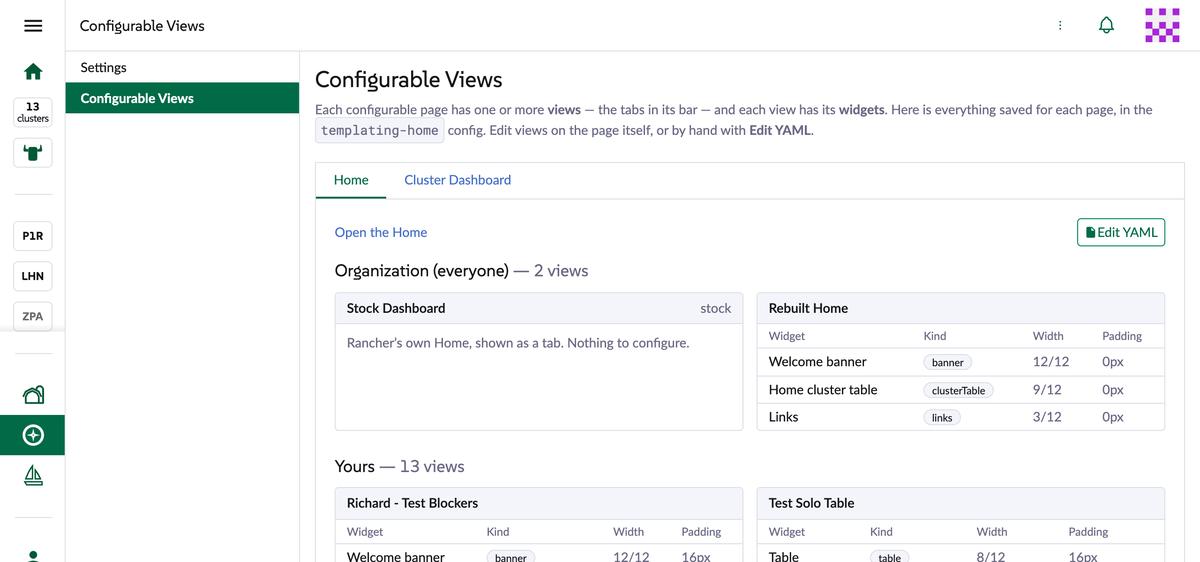
The product has two pages. Settings holds only the switch from thread 29. Configurable Views lists everything saved per page, with Edit YAML. If Decision 1 goes as I recommend, Settings leaves the base, which answers half of Richard's "is there a need for the global product page". The other page is useful to us for debugging. Whether anyone else needs it is the UX question.
Settings: only the switch.Configurable Views: everything saved for each page.
minor, one for UX. should this be a user preference?
The code it points at
1import { ref } from 'vue';23/** Per browser: whether the bar shows is a matter of taste, not something to sync between people. */4const STORAGE_KEY = 'configurable-views-bar-visible';56function read(): boolean {
What I found
It's in localStorage today, per browser, on purpose. A preference would follow the person between machines. It's a small change either way.
What I'll do
No change until UX answers.
Everything in the review body
Issues are disabled on the repo, so the Later and TBD items stay in Richard's review unless you want them filed somewhere else.
Tag
Richard's item
What happens
Discussion
MVP
UX/Dev: how to handle automatic resource updates. At the moment the data on all dashboards does not auto-update. For the first pass we need to make this clear to users
Propose the mock-up, then build it. Your call in Decision 2
MVP
UX/Dev: is there a need for the global product page
When editing a view and the user collapses and expands the edit view section there's a console warning [Vue warn]: injection "Symbol(formSummary)" not found. could be an existing (not introduced by PR)?
Not touching. The symbol is in the shell's TableOfContents/composables.ts, and our package doesn't mention it, so it may well be existing. I haven't traced it
Areas For QA
QA
Home Page: Create a table widget pointing to a downstream cluster. delete the cluster, the page should handle this in a reasonable way
Looks reasonable, tested with a made-up cluster id. See below
QA
Existing Home Page (stock) functionality has not regressed
I'll check after the rebuild
QA
Existing Cluster Explorer Dashboard (stock) functionality (including monitoring) has not regressed
I'll check after the rebuild. This needs a cluster that really has monitoring: local has none and created-dashboard-2 has only the CRD chart
QA
user scenarios - each can manage views on both dashboards: non-admin, stadard-user, cluster member; non-admin, user-base, project member
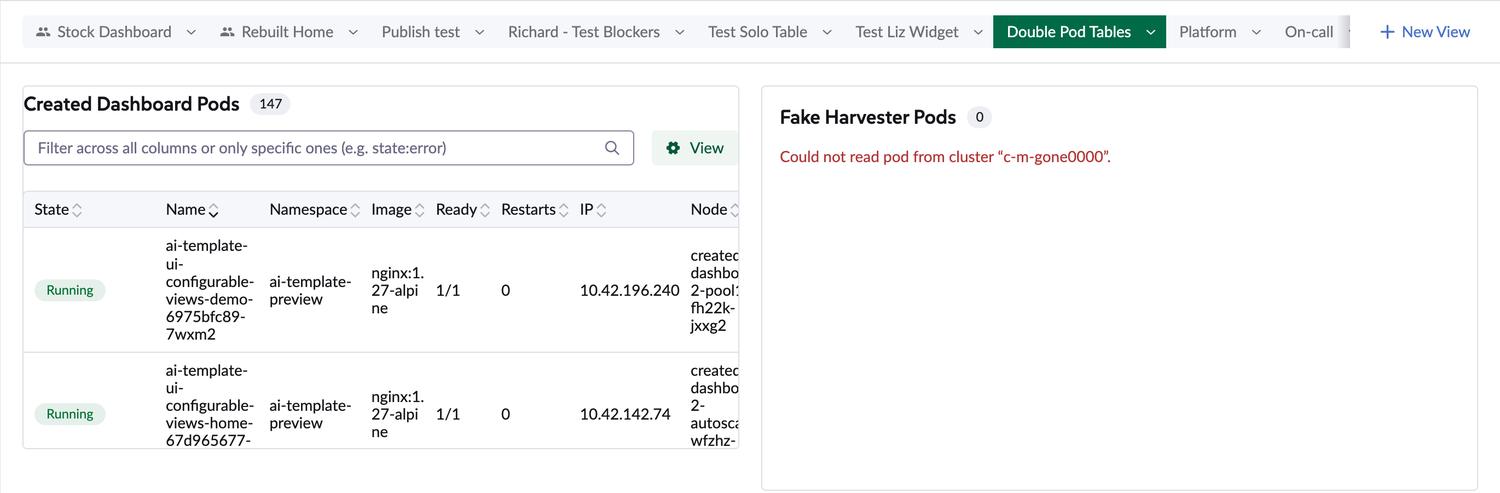
I pointed a Home table at a cluster id that doesn't exist, in my browser only. The widget says "Loading…" for 14 seconds (Rancher answers 500), then shows the error. The other widget and the rest of the page keep working. That seems reasonable to me. Two small things I could polish if you want: it shows the id because the name is gone, and a "0" sits beside the title.
A table whose cluster no longer exists, next to one that's fine.
How it ships and how I'll check it
PR 1: new commits on configurable-home, no force-push, so the threads stay attached. In order: cleanup, the PageViews rename, JSDoc, behaviour fixes and M1-M3, component swaps.
PR 2: rebased once at the end, with the same rules applied to demo-only code. That one is a force-push. 9 of the reviewed files overlap with it.
After each group: lint, type-check:ci and jest, by overlaying the package on a dashboard clone, because the repo has no scripts for those. "Test extensions build" has never started on the PR, so no CI will catch anything.
Previews: rebuilt on shell 3.0.15-rc.4, then checked in a browser against the master preview. I'll tell you before redeploying the demo preview.
GitHub: I won't post a reply or resolve a thread until you've approved it. The drafts here are for you to edit.
Real extension install: never tested. Everything so far is baked into a dashboard build. Installing on mf affects everyone, so I'll ask first.
What I checked for this page
I checked every thread against the code at 0f34877. These I also ran:
Claim
How
Result
The delay
Playwright, with the ConfigMap read stubbed, 3 runs per case, against the master preview
Reproduced
Non-admin access
kubectl --as with 6 users on mf, writes with --dry-run=server
Confirmed Forbidden, except a local cluster owner
What a user with no access sees
Admin session with the configmap schema removed from the response
Simulated: stock tab only, Save fails
Input centring
Pixel gaps from 3x screenshots in 3 engines, then an injected style
Under 1px, and the padding fix works
Wrong-cluster links
A stubbed view on created-dashboard-2's dashboard
Confirmed by reading the links' href
Differences from stock
Same cluster and window size, master preview against the base preview
Five found. To redo on the same shell
Deleted cluster
A made-up cluster id in a stubbed view
Handled
Every browser run blocked ConfigMap writes, and the stubs lived in my browser, so nothing changed on the shared server.
Not checked
A real non-admin login. The test users' passwords were in a scratchpad that's gone, and I didn't want to reset shared accounts. I can create a test user if you OK it.
A real extension install, so also the prime-only check and the logout behaviour, which come from reading the shell.
Any of the fixes. Except for the padding, nothing has been tried yet, so the "What I'll do" sections are plans from reading the code.
Monitoring tabs on a cluster that has monitoring. I still need to find one.